
Live contour
See the shape of your Thai tone
This is not a spectrogram. We only draw the pitch contour so learners can focus on the tone shape instead of all the extra sound detail.
View: Midtone reference
Midtone baseline
Set the reference pitch yourself
Manual baseline at 120 Hz.
Thai tones are relative. Drag the slider until the dashed midtone reference feels right for your own natural speaking pitch.
Reference tones
Five Thai tone guides
Reference pitch
Adjust your baseline
Midtone baseline
Set the reference pitch yourself
Manual baseline at 120 Hz.
Thai tones are relative. Drag the slider until the dashed midtone reference feels right for your own natural speaking pitch.
Compare
bpaa example
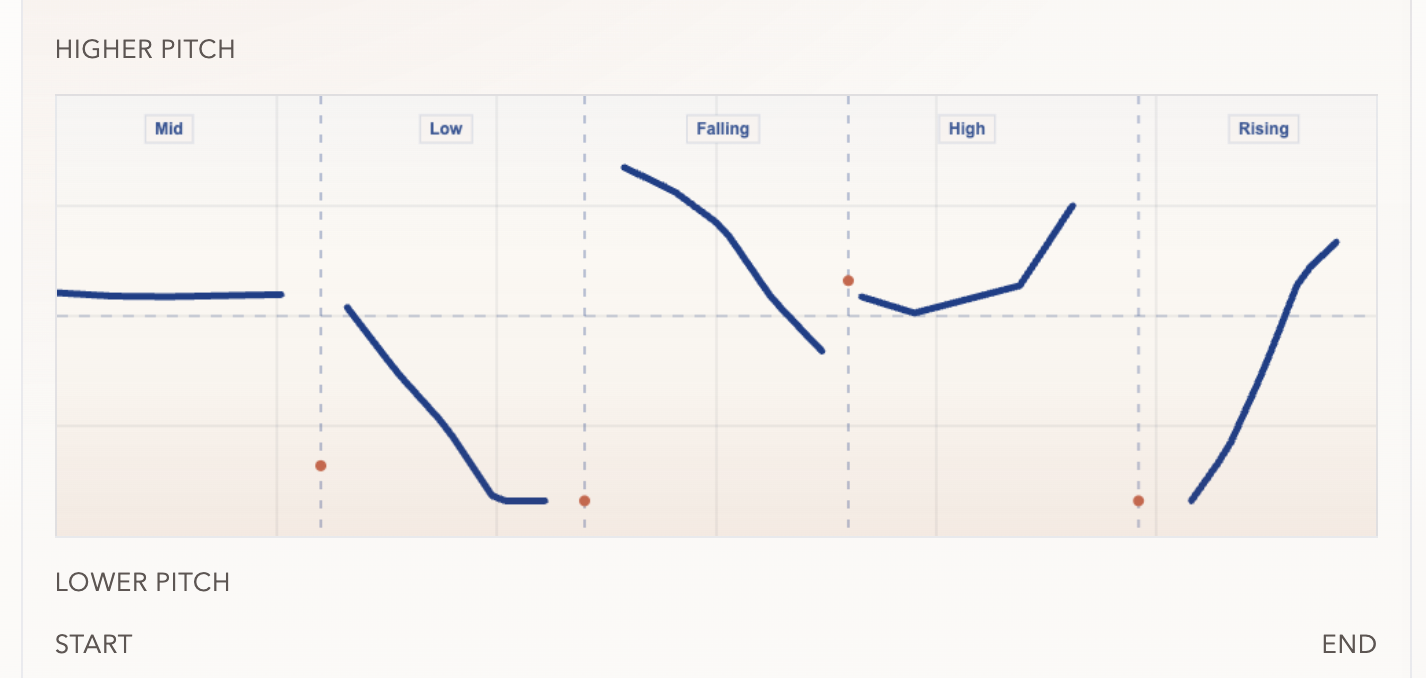
Single-syllable mode overlays an idealized reference contour. Phrase mode keeps each slice at its phrase-level pitch height, so falling and rising words do not need to cross the dashed midtone baseline.
Press start, then say one Thai syllable.
Pitch: --
Try this
Say the five bpaa tones quickly
Keep the syllable the same and only change the tone. Then compare your live curve with the labelled example below.
- bpaa ปา Mid
- bpaa ป่า Low
- bpaa ป้า Falling
- bpaa ป๊า High
- bpaa ป๋า Rising
Show debug data
Debug Data
Raw microphone pitch frames
No live debug frames yet.
This shows what the live detector heard before the teaching contour was smoothed and scaled.
Waiting for live microphone data.
Word slices
Split the contour by dip boundaries
No slices yet.
After you say a short phrase, we look for deep dips in the contour and use them as likely boundaries between words or syllable groups.
- Record a phrase with a small pause or pitch dip between words to see slices here.